
9771 SMS Registration Format: Correct CNIC, Vehicle Number & Province Details

The 9771 SMS registration format is used to submit vehicle and identity details for Pakistan’s Prime Minister’s Fuel Relief Scheme. Applicants need to enter their CNIC number, vehicle registration number, province code and vehicle registration date in a specific order. Even a small typing error may cause the message to fail verification.
The Ministry of Information Technology and Telecommunication has published the SMS-based registration method, allowing applicants to submit their details without needing a smartphone or internet connection. Before sending a message, make sure your information matches your official identity and vehicle registration records.
What Is the 9771 SMS Registration Format?
The registration message follows this structure:
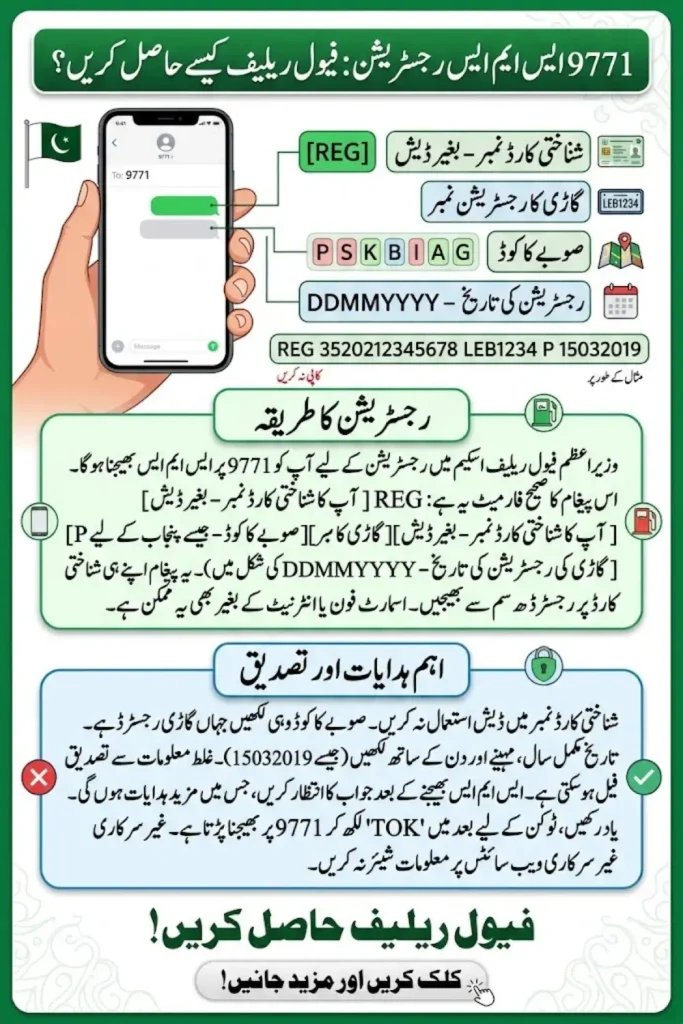
REG [CNIC] [Vehicle Number] [Province Code] [Registration Date]
Send the message to 9771 using the mobile SIM registered against the applicant’s CNIC.
Each item must be entered in the correct order and separated by a single space. Do not include the square brackets; they simply indicate where your own details should go.
Correct Details Required for 9771 Registration
Prepare the following information before composing your SMS.
1. CNIC Number
Enter your 13-digit Computerized National Identity Card number without dashes or spaces.
Correct format: 3520212345678
Incorrect format: 35202-1234567-8
Use the CNIC details belonging to the person applying. The registration SMS should be sent from a SIM registered to that same CNIC, as stated in the published instructions.
2. Vehicle Registration Number
Enter the vehicle’s registration number as recorded in its official registration documents. Follow the scheme’s current instructions for removing spaces or dashes, if required.
For example, if your plate is written as LEB-1234, the SMS format may require it as LEB1234. Confirm the precise format against the latest official guidance if your registration plate uses a less common pattern.
Do not use a guessed, incomplete or incorrect vehicle number. The details may be checked against vehicle registration records.
3. Province Code
The province or territory code identifies where the vehicle is registered. The published format uses the first letter of the relevant province or area.
| Province or territory | Code |
|---|---|
| Punjab | P |
| Sindh | S |
| Khyber Pakhtunkhwa | K |
| Balochistan | B |
| Islamabad Capital Territory | I |
| Azad Jammu and Kashmir | A |
| Gilgit-Baltistan | G |
Use the code that matches the vehicle’s registration area, rather than simply choosing the place where you currently live.
4. Vehicle Registration Date
Enter the vehicle’s registration date in the format DDMMYYYY—day, month and four-digit year—with no slashes, hyphens or spaces.
For example, a hypothetical date of 15 March 2019 becomes 15032019.
Check the date on your vehicle’s registration book, smart card or relevant official record. Do not substitute the purchase date or the date you began using the vehicle unless it is also the recorded registration date.
Example of a 9771 Registration SMS
The following is a format-only example using fictional details:
REG 3520212345678 LEB1234 P 15032019
In this example:
REGis the registration keyword.3520212345678is a fictional CNIC.LEB1234is a sample vehicle number.Prepresents Punjab.15032019is a sample registration date.
Do not copy this example as your own registration message. Replace every sample value with your own verified information.
How to Send the SMS to 9771
- Check that the SIM you will use is registered against the applicant’s CNIC.
- Open the SMS or messaging app on your phone.
- Start a new message and enter 9771 as the recipient.
- Type
REG, followed by your CNIC, vehicle number, province code and registration date, using single spaces between each item. - Review the message carefully against your official documents.
- Send the SMS and wait for the system’s response.
The Ministry of IT has published this SMS process for registration. Follow any instructions in the reply, and do not assume that sending the SMS alone means your vehicle has been approved.
Common SMS Registration Mistakes
A registration attempt may encounter problems if the submitted details do not match the required format or official records. Check for these common errors:
- Incorrect CNIC: Use all 13 digits and remove dashes.
- Wrong province code: Select the area where the vehicle is registered.
- Incorrect registration date: Use the documented date in DDMMYYYY format.
- Vehicle-number mismatch: Check the plate number against the registration record.
- Incorrect spacing: Keep the fields in the required order and separate them with spaces.
- Using another person’s SIM: Use the SIM registered to the applicant’s CNIC, as directed in the published procedure.
If you receive an error message, review the details rather than repeatedly sending the same incorrect SMS. Use official scheme guidance or relevant vehicle-registration authorities to resolve mismatches.
What Happens After Registration?
After sending the registration SMS, wait for a response confirming whether the details were received or whether further action is required. A submitted message should not be treated as proof of eligibility or successful verification.
Published government instructions also describe a separate fuel-token step for registered applicants: sending TOK to 9771 before visiting a participating fuel station. Follow the latest official instructions in your confirmation message and check the scheme’s current eligibility, token and redemption rules before travelling.
Do not share your CNIC, vehicle documents or verification messages with unofficial websites or individuals promising guaranteed approval. Use official government channels for updates and assistance.
Frequently Asked Questions
What is the correct SMS format for 9771?
The published structure is REG [CNIC] [Vehicle Number] [Province Code] [Registration Date]. Enter your actual details in the stated order, without the square brackets, and send the message to 9771.
Should I enter my CNIC with dashes?
No. The published instructions specify the CNIC without dashes. Enter the full 13-digit number as one continuous sequence.
Which province code should I use if I live in a different province?
Use the code associated with the vehicle’s registration area, not necessarily your current residence. Check the vehicle’s official registration record if you are unsure.
What date format is required?
The registration date is entered as DDMMYYYY. For example, 15 March 2019 is written as 15032019, without punctuation or spaces.
Can I register using someone else’s SIM?
The published instructions say to send the registration SMS from a SIM registered against the applicant’s own CNIC. Check the current official requirements before submitting.
Is sending the registration SMS enough to receive fuel relief?
Not necessarily. Registration details may need verification, and eligibility and token requirements also apply. Wait for the official response and follow the instructions provided.
Conclusion
The 9771 SMS registration format requires the applicant’s CNIC, vehicle registration number, province code and registration date in a fixed order. Check each detail against official records before sending the message to 9771, and use the SIM registered to the applicant’s CNIC. After submitting your details, follow the official response for verification and any next steps. For changes to eligibility, tokens or redemption procedures, rely on current government instructions rather than unverified social media posts or unofficial registration services.